Block what pulls you away
Choose the apps that eat your time. Shield them all day, on a weekly schedule, or with a one-tap Block Now session when you need to sit down and work.
Screen time, taken seriously
Rebound blocks distracting apps and gives you a deliberate moment to choose what you do next.
Built for iPhone. Requires iOS 17 or later.
Choose the apps that eat your time. Shield them all day, on a weekly schedule, or with a one-tap Block Now session when you need to sit down and work.
Opening a blocked app starts with a breath and one honest question. Still want in? You choose exactly how many minutes, and the cost of that choice is shown up front.
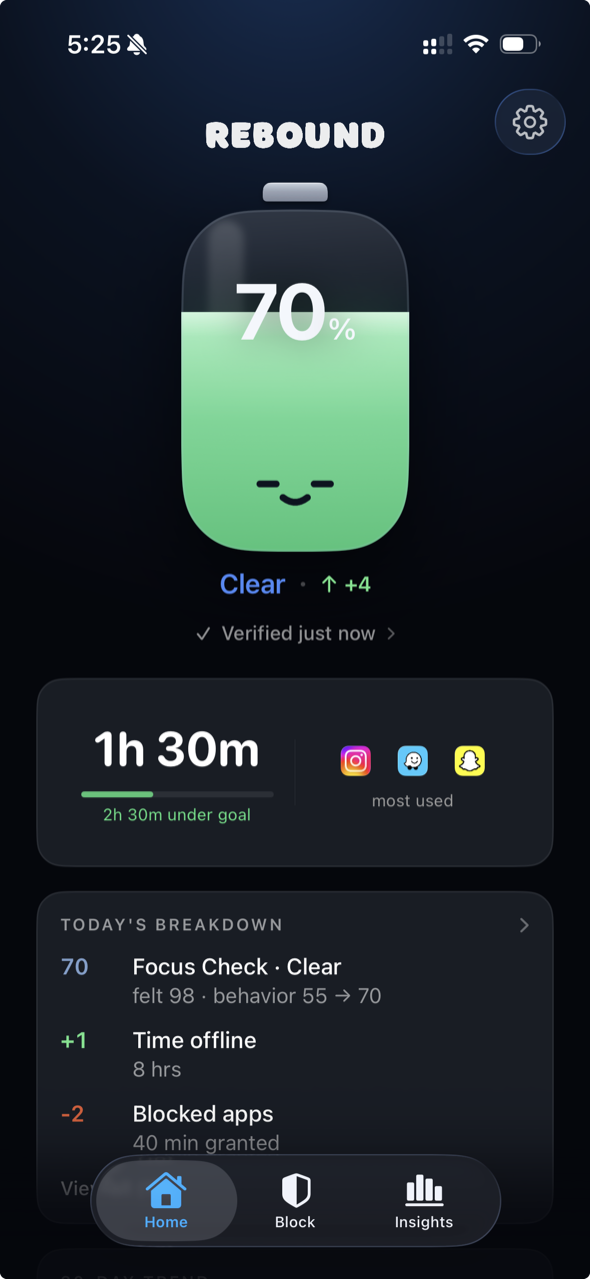
The Battery is one live number that reflects how you have treated your attention today. Walking away charges it. Slipping drains it. No streaks, no guilt, just data.
Rebound does not lecture you and it does not gamify your life. It puts a small, honest checkpoint between impulse and action.
Select the apps that pull you under. Rebound shields them using Apple's Screen Time framework.
Block all day, on a schedule that fits your week, or start a timed focus session from five minutes to eight hours.
Tap a blocked app and Rebound opens instead: a short guided breath, then one question. Is this how you want to spend your time?
Walk away and your Battery charges. Open anyway and you set the minutes yourself. Either way, it was your decision, not the algorithm's.
Rebound is an auto-renewable subscription, billed through your Apple ID. Payment is charged to your App Store account, and your plan renews automatically unless you cancel at least 24 hours before the end of the current period. Manage or cancel anytime in your device's subscription settings.
Screen Time limits are easy to dismiss with one tap. Rebound replaces that tap with a short pause: a breath, a question, and a real choice. You can still get in, but you decide deliberately, and you choose exactly how many minutes you need.
Yes, unless you chose Hard Mode. In the standard flow, tapping a blocked app starts a brief breathing pause, then asks whether this is how you want to spend your time. If it is, you pick 5, 10, or 20 minutes and the app opens. Hard Mode locks the app fully until the window you set has ended.
Rebound has no accounts and no backend of its own. Your blocking rules, activity, and journal entries are stored on your device. Screen-time details are handled by Apple's Screen Time framework, which is designed so that apps like Rebound never see your raw browsing. See the Privacy Policy for the full picture.
Rebound is an auto-renewable subscription purchased through the App Store: $39.99 per year (includes a 7-day free trial), or $4.99 per week. You can cancel anytime in your Apple ID subscription settings.
Rebound is built for iPhone and requires iOS 17 or later. It uses Apple's Family Controls framework, so it needs Screen Time permission to block apps.
Put a deliberate pause between you and the scroll. Start today.
Download on the App Store